1080P WiFi Pan/Tilt Camera: Color Night Vision Guide
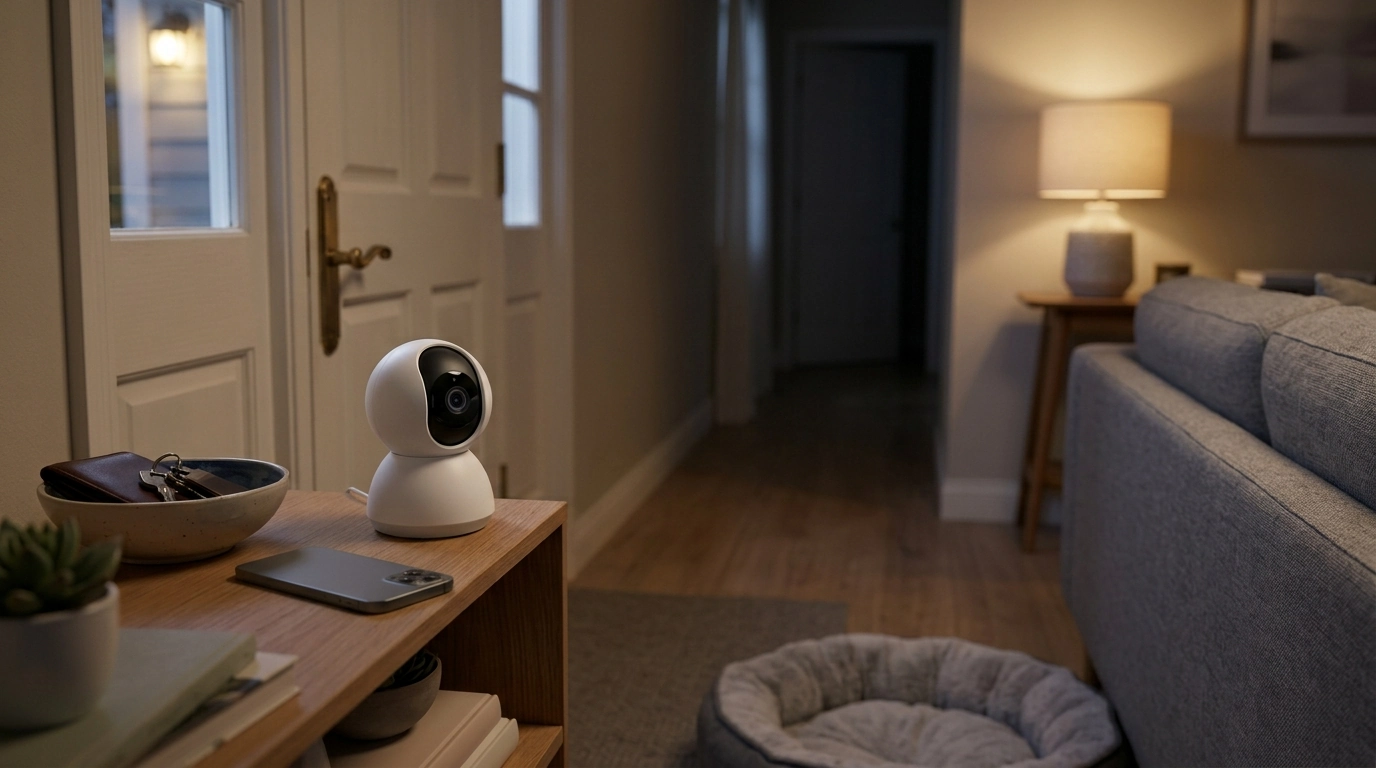
1080P WiFi Security Camera with Color Night Vision and 360° Pan/Tilt
A compact indoor camera can cover an entire room when it combines 1080P video, remote pan/tilt control, and color night vision. The result is a setup that’s easier to place, faster to check when you’re away, and more useful at night when details matter. Below is a practical guide to what these features do in everyday use, how to set the camera up for reliable monitoring, and how to tune alerts so you get fewer false notifications.
What this camera is designed to do
- Provide continuous room coverage using 360° pan/tilt control instead of a fixed viewing angle.
- Capture clearer details after dark with color night vision modes, not just black-and-white infrared.
- Send motion-triggered alerts to a phone for quick check-ins when away from home.
- Fit common indoor needs such as entryway monitoring, nursery viewing, pet check-ins, and package/door activity from inside.
Core features that matter day to day
1080P video clarity
1080P resolution helps you recognize faces, clothing, and movement paths better than lower resolutions at the same distance. For indoor use, that typically means fewer “pixel guess” moments when reviewing motion clips or checking live view from another room.
Pan/tilt range for multi-zone coverage
Pan/tilt is the difference between watching one corner and watching the whole space. It’s especially helpful when you want one camera to check multiple zones—like a front door, a hallway, and a window—without relocating the device or buying a second unit.
Color night vision (and when to use IR)
Color night vision is most helpful when there’s at least a small amount of ambient light available. When the room is truly dark, many cameras provide an IR (black-and-white) option that can look cleaner and reach farther than a color image struggling in near-zero light.
Two-way audio and alert controls
If supported by the model and app, two-way audio adds everyday value: checking in with family, calming a pet, or using a quick voice prompt if someone shouldn’t be there. Motion alerts are equally important—being able to adjust sensitivity and schedules often matters more than raw specs.
Color night vision: getting the clearest view after dark
- Place the camera where it can use some ambient light (a hallway night light, porch light through a window, or a lamp on a timer) for more natural color detail.
- Avoid aiming directly at reflective surfaces (glass frames, mirrors, glossy TVs) that can cause glare and washed-out highlights.
- If the image looks noisy in very dark rooms, switch to IR (black-and-white) mode if available for cleaner contrast and longer range.
- Keep the lens clean; fingerprints and dust scatter light and reduce sharpness at night.
A simple trick that works well in living rooms: keep a low-intensity lamp on a smart plug or timer during overnight hours. The goal isn’t a bright room—it’s just enough steady light to preserve color cues without triggering harsh reflections.
360° pan/tilt coverage: how to set a useful patrol pattern
Pan/tilt is most effective when it’s intentional. Instead of constantly steering the camera, pick a few angles that answer the most important questions quickly.
- Identify 2–4 priority zones: entry door, main walkway, stairwell, and a valuables area.
- Use preset positions (if available) so one tap jumps the camera to a known angle quickly.
- Aim slightly downward when mounted high to reduce ceiling space and maximize floor coverage where motion occurs.
- Keep the camera’s turning path free of obstructions and avoid tight corners where the view can be blocked.
Room placement ideas and what they help cover
| Placement | Best for | Watch-outs |
|---|---|---|
| High corner of living room | Wide coverage of entry points and seating area | Avoid pointing at large windows to reduce backlight |
| Hallway end facing toward doors | Capturing movement routes between rooms | Motion may trigger frequently in busy households |
| Near entryway (indoors) facing front door | Door activity and quick identification | Glare from sidelights/door glass can affect night view |
| Nursery/pet area | Monitoring sleep or pet behavior | Use privacy mode when not needed |
WiFi reliability and setup tips
Motion alerts with fewer false alarms
Privacy and security practices for indoor cameras
For additional guidance on securing connected devices and home networks, review recommendations from CISA and the NIST Small Business Cybersecurity resource hub.
Storage and playback basics
Common issues and quick fixes
Product snapshot and where it fits best
- 1080P WiFi Security Camera with Color Night Vision & 360° Pan/Tilt ($34.01)
- 95oz Cordless Cat Water Fountain – Battery Powered & Ultra-Quiet Pet Feeder ($59.97) for quieter pet routines while monitoring a pet area
- Adjustable No-Pull Dog Harness & Leash Set with Reflective Safety Design ($21.51) for safer, more visible outings after you’ve checked home status
FAQ
Does color night vision work in complete darkness?
Usually not. Color night vision typically needs some ambient light; in very dark rooms, switching to infrared (black-and-white) mode often produces a clearer, less noisy image.
How much area can a 360° pan/tilt camera cover?
From one mounting point, pan/tilt can look around most of a room, but real coverage depends on placement height and obstructions like walls, shelves, and door frames. Presets help you jump to key zones quickly instead of manually steering each time.
What’s the best place to mount an indoor pan/tilt camera?
A high corner angled slightly downward usually provides the best overall view while keeping the camera out of reach. Avoid direct window glare and reflective surfaces, then test motion alerts after positioning to confirm you’re capturing the areas that matter.














Leave a comment