Wireless RGB Keyboard with TFT Screen, Hot‑Swap & Gasket
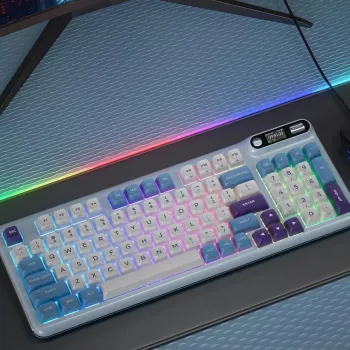
Wireless RGB Mechanical Keyboard with TFT Screen and Hot‑Swap Gasket Build
A keyboard that combines flexible connectivity, customizable lighting, and a screen for quick info can streamline both play and work. This overview breaks down what the TFT display, hot‑swap sockets, and gasket mounting change in day-to-day use—plus what to check before buying.
What stands out at a glance
This style of board is built for people who want a cleaner setup, easier device switching, and room to tune feel and sound over time. The headline features tend to work together: wireless keeps cables off the desk, RGB improves visibility and personality, and the TFT screen adds quick status without opening an app.
- Wireless connectivity for cleaner desk setups and easier device switching
- RGB lighting for visibility and personalization in different environments
- TFT screen for at-a-glance status, profiles, or simple on-board visuals (implementation varies by model/firmware)
- Hot-swap switch support for fast switch changes without soldering
- Gasket-style mounting aimed at reducing harsh vibration and improving typing acoustics
- Designed for enthusiasts who tune feel, sound, and layout behavior over time
If you want a ready-to-go option, see the Wireless RGB Mechanical Keyboard with TFT Screen & Hot-Swap Gasket Design. For a desk area that looks intentional (especially if your keyboard is a centerpiece), pairing it with storage like the Elegant Solid Wood Nightstand with Rattan Storage – Modern Moroccan Design can help keep cables, accessories, and spare switches out of sight.
TFT screen: practical uses and what to verify
A small TFT screen can be more than a novelty when it’s configured well. Common daily wins include checking battery at a glance, confirming whether you’re in Bluetooth or 2.4 GHz mode, and seeing which layer/profile is active—especially helpful if you remap keys or swap between work and game layouts.
- Common uses include battery status, connection mode, active layer/profile, time, or small animations depending on firmware support
- Check whether the screen is configurable through software, on-board controls, or both
- Confirm screen placement doesn’t interfere with key access or preferred layout
- Look for brightness controls and idle behavior to avoid unnecessary battery drain
- If customization matters, verify supported file types/animation limits and whether community tools exist
| Check | Why it matters | What to look for |
|---|---|---|
| Customization method | Determines how easy it is to change what’s displayed | On-board menu, desktop app, or open firmware support |
| Displayed info | Affects daily usefulness | Battery %, connection mode, profile/layer, media/status widgets |
| Brightness/timeout | Impacts battery life and comfort | Adjustable brightness, screen sleep timer |
| Firmware updates | Improves stability and adds features | Clear update process and ongoing support notes |
If you prefer open, widely used remapping workflows, it’s also worth checking whether your model supports tools such as VIA keyboard firmware (support varies by keyboard and controller).
Hot-swap switches: how it changes ownership
Hot-swap sockets make a mechanical keyboard feel less “finished” and more “upgradeable.” Instead of being locked into one switch type, you can change the entire board’s personality in minutes—smooth linears for gaming, more tactile feedback for typing, or lighter/heavier springs depending on finger fatigue.
- Switches can be replaced to change feel (linear/tactile/clicky) without soldering
- Ideal for trying different switch weights for gaming versus long typing sessions
- Helps extend lifespan by replacing a single faulty switch instead of the whole board
- Confirm switch compatibility (commonly MX-style, 3-pin/5-pin support varies)
- Use a proper switch puller and insert switches straight to reduce risk of bent pins
For long-term flexibility, compatibility matters as much as the feature itself. If the board supports both 3-pin and 5-pin MX-style switches, it reduces the chance you’ll need to clip plastic legs or hunt for a specific variant later.
Gasket mounting: feel, sound, and stability
Gasket mounting aims to isolate the internal assembly (plate and PCB) from the outer case using compressible material. In practice, that usually means a softer bottom-out, less case resonance, and a typing sound that can be more “rounded” than harsher mounting styles.
Wireless performance: everyday expectations
For spec-level details on how Bluetooth devices communicate and evolve across versions, the authoritative reference is the Bluetooth Core Specification. For charging and connector expectations, the USB Type-C documentation from USB-IF is a helpful baseline.
RGB lighting: customization without distraction
Setup tips: getting the best experience quickly
Price and value considerations
For a feature-packed option that checks the main boxes—wireless, RGB, hot-swap, gasket, and a display—visit the Wireless RGB Mechanical Keyboard with TFT Screen & Hot-Swap Gasket Design.
FAQ
Can hot-swap keyboards use any mechanical switch?
Not always. Most hot-swap boards are designed for MX-style switches, and compatibility can depend on whether the sockets accept 3-pin only or both 3-pin and 5-pin switches. Low-profile or non-MX switch types typically won’t fit, and careful pin alignment helps prevent bent pins during installation.
Does the TFT screen reduce battery life?
It can, depending on brightness, whether animations are running, and how long the screen stays on before sleeping. Using a lower brightness setting, enabling a screen timeout, and dialing back RGB are common ways to extend runtime.
Is a gasket-mounted keyboard better for gaming?
Gasket mounting mainly changes feel and sound rather than raw performance. Gaming responsiveness depends more on switch choice, stabilizer quality, and using a low-latency wireless mode when available. That said, a softer, less harsh bottom-out can feel more comfortable during long sessions.













Leave a comment